Blog

Your blog category

Before vs After – The Power of Proper Cable Management

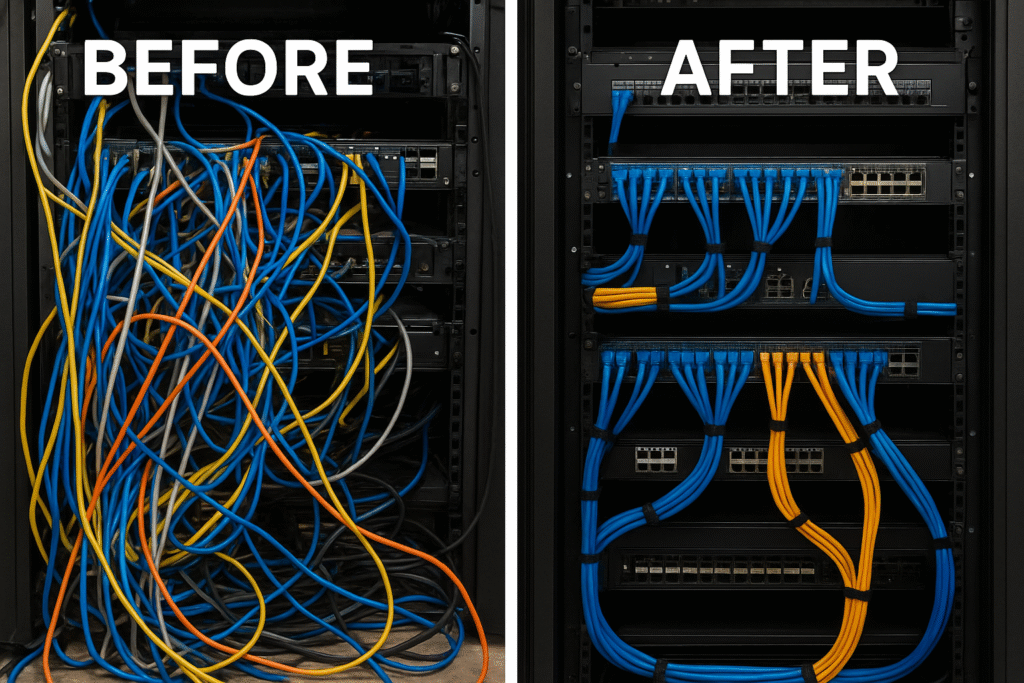
In the world of IT infrastructure, cables are the silent backbone that keeps everything running smoothly. Yet, in many offices, server rooms, and workspaces, cable management is often ignored—until something goes wrong. A messy bundle of wires doesn’t just look bad; it impacts performance, safety, and long-term reliability. That’s why proper cable management is one of the most valuable (but underrated) upgrades any business can make. Let’s explore the Before vs After transformation and understand why cable management matters more than you think. Before: The Problems with Messy Cables When cables are left unmanaged, they create a chain of issues that affect both productivity and safety. Hard to Identify & Fix Issues Tangling makes it almost impossible to quickly find the right cable during troubleshooting. Even a simple task—like replacing a router or switching a device—can take hours. Overheating & System Damage Cluttered cables block airflow around systems, causing overheating. This can reduce the lifespan of servers, switches, and other devices. Higher Risk of Accidents Loose cables can lead to: Poor Professional Appearance A messy server rack or office space reflects poorly on your organization. It gives an impression of unstructured management and low IT hygiene. Downtime Increases In emergencies, every second counts. Unorganized cables slow down response time, leading to longer downtime and higher costs. After: The Benefits of Proper Cable Management Once your cables are organized, the difference is not just visual—it transforms your entire IT environment. Faster Troubleshooting Labeled, color-coded, and neatly arranged cables help IT teams resolve issues quickly and confidently. Improved Airflow & Device Health Organized cables allow better ventilation, reducing heat buildup and extending the life of your equipment. Enhanced Safety Proper cable routing reduces fire risks, prevents accidental disconnections, and creates a safer workspace. Professional & Clean Look A neat setup impresses clients, auditors, and teams. It reflects discipline, professionalism, and technical excellence. Future Scalability Whether you’re upgrading your system or expanding your network, a structured cable setup ensures: The Transformation Speaks for Itself A Before vs After cable management transformation often shows: Before: Messy wires, dust buildup, overheating, wasted space, high downtime. After: Clean layouts, labeled cables, optimal airflow, improved performance, safer workspace, and a professional setup. These improvements lead to better productivity and long-term cost savings. Why Businesses Should Prioritize Cable Management Whether you’re managing: Proper cable management is essential for operational efficiency and safety. It’s a one-time investment that delivers lasting benefits.

Before vs After – The Power of Proper Cable Management Read More »

Dust is harmful to electronics

Dust is harmful to electronics

Why is dust harmful to electronics? The question a lot of clients ask is why doesn’t there inverter or UPS fail, the main reason is due to harmful dust. Dust differs from one location to the next, but dust particles comprise moisture (water and oil), organic material, minerals, and chemicals in varying proportions. Dust particles can start to impact the operation of electronic devices within 6 months. The conductive materials found within dust’s harmful particles can also lead to signal errors and component failures. When it comes to eradicating dust from your backup power devices, it is best to invest in regular backup power maintenance undertaken by professionals. This way you are preventing the accumulation of dust in the first place and allowing your backup power to operate at maximum efficiency. To ensure the optimum performance of critical equipment, like standby power systems, it is important to undertake routine maintenance. The expert technicians at BHG Power have in-depth knowledge of every product we supply and with decades of industry experience, can offer the highest level of maintenance support for every customer. WHAT ARE THE BENEFITS OF ROUTINE MAINTENANCE? WHY BHG POWER IS THE PREFERRED CHOICE. Have you ever wondered why your Inverter or UPS fail or just shut down? The life span of an Inverter or UPS has a huge impact due to dust. Dust particles can accumulate and start impacting electronic device operation within two years. The conductive materials found within dust particles can also lead to signal errors and component failures.

Dust is harmful to electronics Read More »

MAINTAIN YOUR UPS BATTERY

Maintain Your UPS Battery

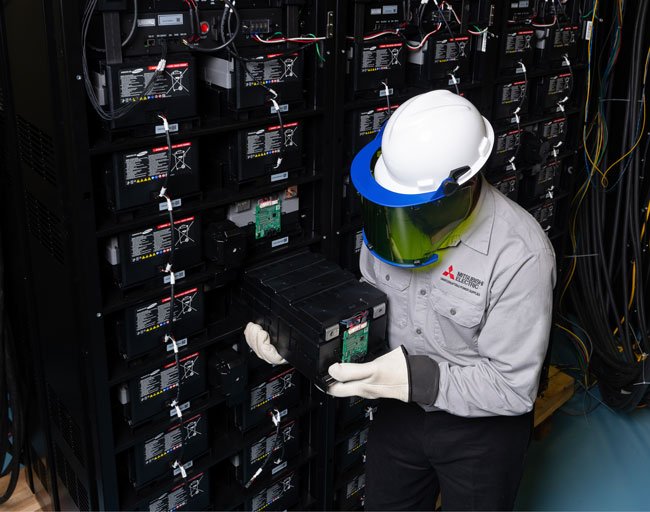
How to Maintain Your UPS Battery: A Complete Guide A UPS (Uninterruptible Power Supply) is only as good as its battery. If the battery fails when there’s a power cut, the UPS won’t serve its purpose. Regular maintenance of UPS batteries ensures reliability, prolongs battery life, and avoids unexpected downtime. Below are best practices, checks, and precautions. Why UPS Battery Maintenance Matters Key Factors Affecting UPS Battery Life Routine Maintenance Checklist Frequency Task What to Check / Do Monthly / Bi-Monthly Visual inspection Look for leakage, swelling, cracked cases, corrosion on terminals, discoloration, bulging. Cleaning Use soft brushes, dry cloth, or compressed air to remove dust. Avoid moisture. Check terminal tightness / connections Loose connectors lead to heat, resistance, and premature failure. Check battery status / alerts Many UPS units have diagnostic tools; watch warnings, voltage levels, internal resistance. Quarterly / Semiannually Test battery / load test / capacity check* Evaluate how long the battery can actually support load. Thermal scan / infrared check Identify hot spots / loose connections in wiring or terminals. Check cooling / ventilation Ensure the UPS room or cabinet has proper airflow, no blockage, maintain temperature and humidity Annually Full system test Simulate power failure, run battery to its specified discharge point, check performance under load. Record & trend measurements Log internal resistance, voltages, capacity to observe gradual degradation. * When doing load tests, ensure critical loads are protected or isolated, and you are confident in your UPS’s capacity. Additional tasks like firmware updates, checking bypass circuits, inspecting related UPS components (fans, capacitors) are also part of periodic maintenance. Tips & Best Practices When Should You Replace the Battery? In many practical cases, users replace batteries every 3–5 years depending on usage, environment, and quality.

Maintain Your UPS Battery Read More »

Scroll to Top